Build your client's contact list for one campaign.
Describe who they need to reach in plain language. Claude writes the criteria, tells you exactly how many people match, shows you ten of them, and hands you a workbook with your client's name on it.
Watch a real audience, from the segments to the pull
The real page: an audience with its segments and the number who match each one, a segment opened, and the pull with the price shown before you confirm. Silent, on a loop.
The whole walk · seven stops
Seven stops, from one sentence to a list your client can use
Here's the walk, in the order you'll do it.
1. Open Campaign Audience
it's in the sidebar, under Audiences
2. Describe the buyer
one sentence; Claude writes the criteria
3. See the count and ten sample rows
exact and free, before you pull
4. Pull what you want
pick a number; the price shows first
5. Reach further
widen the net, or go direct mail
6. Download the workbook
the client's name across the top
7. Work the list
notes from your own email, a safe number a day
The client's campaign needs a list, and there isn't one.
Here's where to build it, for this campaign, today.
Step 1 · Open Campaign Audience
It's in the sidebar, under Audiences
Pick the client you're working on. Then open Audiences in the left sidebar and click Campaign Audience. Your audiences sit at the top as cards, one per campaign. Open one and you're looking at its segments, each with the number of people who match and how many you've pulled.
1Pick the client
on the dashboard
2Open Audiences
in the left sidebar
3Click Campaign Audience
the first row — or its card on the dashboard
The page · top to bottom
Describe · Build · ExportBellhaven Design + Build
Campaign Audience
Your audiencesone card per campaign; New Audience starts another
The segmentsthe buyer split into groups you'd message differently, each with its count
Matches · Pulledthe exact number who match, and how many you've taken
The sampleten real people under each segment, before you decide
Pullpick how many; the price shows first
Downloadthe workbook, or an emails-only file
The four buttons you'll press, in order
1Create Audience2Pull3Download4Add segments
The sidebar · Audiences
Audiences
Campaign Audienceclick here
Lead Flows
Coverage Opportunities
What's different here
A list for one campaign
build it when the campaign needs it, instead of renting a database seat all year.
You see the real number first
an exact count of who matches, and ten sample contact rows, before you pull anything.
It's business contacts
who you sell to in B2B: titles, companies, business emails and addresses. Not consumer lists.
You describe the buyer, and Claude writes the criteria.
Industry, seniority, size and location, split into segments. Free.
Step 2 · Describe the buyer
Describe who the client needs to reach, the way you'd brief a colleague
Click New Audience. Name it, pick the kind of list, and type who the client needs to reach in a sentence. Say how many you're after. Click Create Audience. It's free. A couple of minutes later Claude has turned the sentence into real criteria, industry, seniority, company size, location, and split the buyer into segments you'd message differently.
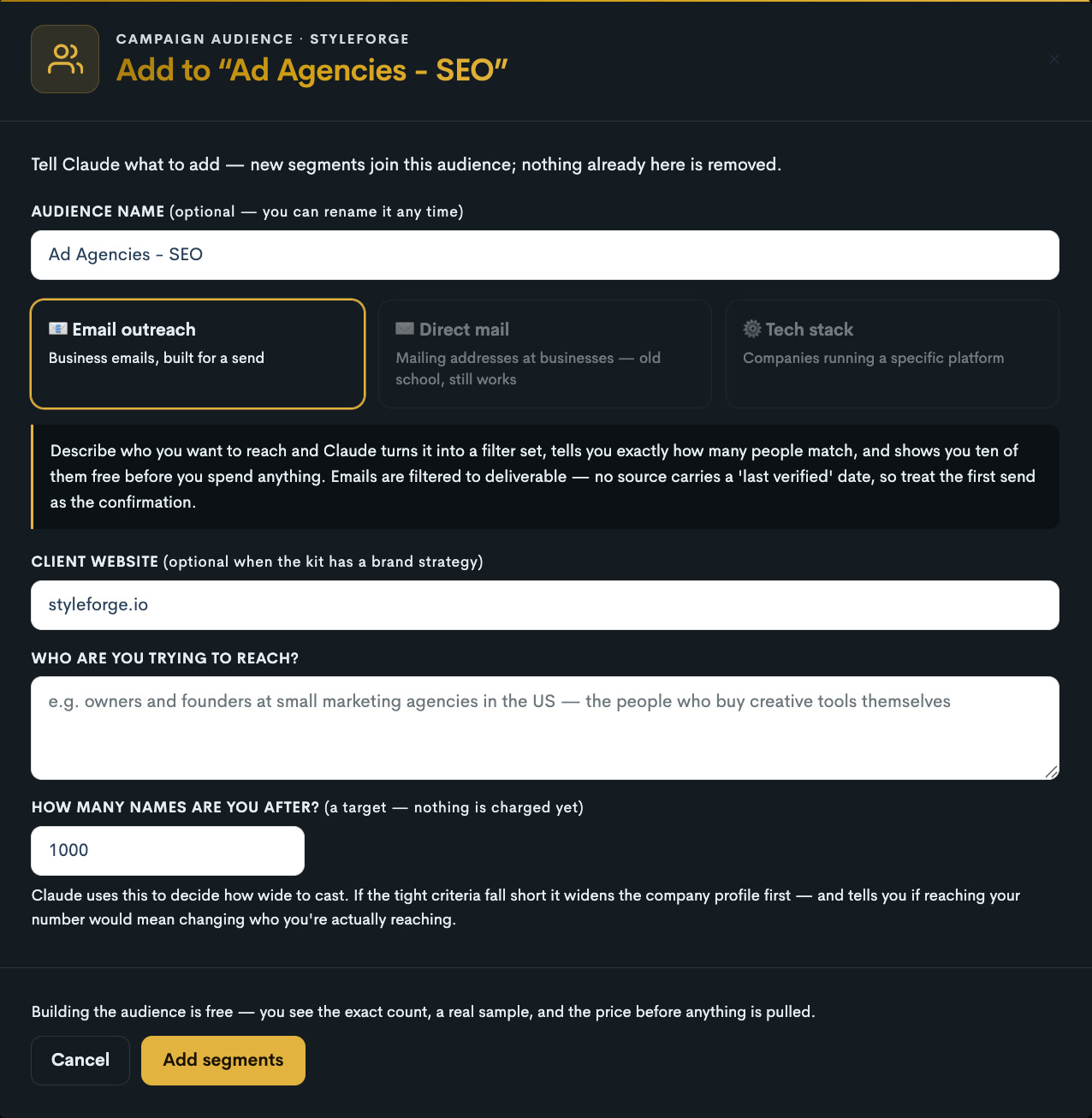
The real form. Name the audience, pick the kind of list, say who you're trying to reach and how many. Adding segments to an audience later uses the same form.
New Audience · filled in for Bellhavenfree to build
Name
Commercial kitchens — Northeast
What kind of list
Email outreach
Business emails, built for a send
Direct mail
Mailing addresses at businesses — old school, still works
Tech stack
Companies running a specific platform
Client website
bellhavenbuild.com
Who are you trying to reach?
Property managers and multifamily developers in the Northeast who renovate kitchens across a portfolio. Directors and above at firms with 50 to 500 units. No brokers.
How many?1000Create Audience
Reading the brand strategy…Writing the criteria…Checking them against the live list…Counting each segment…Pulling ten to look at…
The segments Claude wrote3 segments · 6,078 people match
Property managers
property management · Northeast US · 50–500 units · director and above
Matches
4,318
Pulled
0
Pull
Multifamily developers
real estate development · Northeast US · 11–200 staff · owner, partner, VP
Matches
1,120
Pulled
0
Pull
Boutique hotel owners
hospitality · New England · 11–50 staff · owner, GM
Matches
640
Pulled
0
Pull
What Claude did with your sentence
Industryproperty management · real estate development · hospitality
Senioritydirector, VP, owner, partner, GM — no coordinators
Company size50–500 units, or 11–200 staff
Locationthe six Northeast states
Dropped“brokers” — excluded, as you asked
Plain language in, real criteria out
the source has dozens of industries and hundreds of locations; you never scan them
Segments you'd message differently
each gets its own criteria, count and sample, so you can buy one and skip another
A tighter brief is the biggest lever
name the size, the rank and what to exclude, and the list comes back exactly that
You see the exact count, and ten sample contacts.
Check the shape of the list before you pull anything. Those ten are already yours.
Step 3 · See the count and ten sample rows
Exact list counts and ten sample contact rows, before you pull from the list
Open a segment. You get an exact count of who matches, free, and ten sample contact rows: name, title, company, email, and a line about what the business does. Check that the list is the right shape before you pull more. Those ten are yours to keep.
Property managers
property management · Northeast US · 50–500 units · director and above
Matches
4,318
Pulled
0
Pull
People who match
4,318
exact, counted just now
Kind of list
Email
business emails, built for a send
Where
Northeast
the six states
Your sample
10
real people, already yours
Ten sample rows · four shown
JM
Jordan M.Director of Property Management · Harborline Residentialjordan@…
manages 38 apartment buildings across Boston and Providence
AK
Anita K.VP Operations · Northgate Livinganita@…
operates 2,400 rental units in Connecticut and Massachusetts
TR
Theo R.Owner · Redbrick Property Grouptheo@…
family-run manager of 14 multifamily properties in Vermont
LS
Lena S.Head of Asset Management · Pinecrest Communitieslena@…
renovates and repositions garden-style apartments in New England
Before you buy
An exact count, free
the precise number of people who match, in seconds — there are this many; how many do you want?
Ten sample rows, up front
real names, titles, companies and emails, so you can check the shape of the data before you pull — and they're the start of your list
The rank stays true
ask for directors and above and that's who comes back; nobody drifts in from a looser filter
More than an email
title, company, size, industry, location, and what the business does — the line that makes a first note writable
Junk removed first
duplicates and flagged addresses are stripped before the list reaches you
You pick how many you want, and the list lands in seconds.
The price shows first. Pull again later and you get new people.
Step 4 · Pull what you want
Pick how many you want from a segment, see the price, and the list lands in seconds
Click Pull on a segment and type a number. The price shows before you confirm. The list lands in seconds, and the segment's Pulled count moves. Come back later and pull more from the same segment, and you get new people, never the same ones twice. If the pool runs out before your number, the list arrives with what exists and the row says why.
Campaign Audience · PullProperty managers
People who match
4,318
in this segment
How many do you want?
500
any number up to the count
Price
shown here
before you pull; nothing charges on a guess
Pull 500CancelYou can pull more from this segment later. You'll get new people each time.
Pulling 500 property managersseconds, not minutes
Property managers
property management · Northeast US · 50–500 units · director and above
Matches
4,318
Pulled
500
Pull
How pulling works
The price shows first
you see it before you confirm, and an empty pull costs nothing
Seconds, not minutes
the whole segment can land in under twenty seconds
Pull again, get new people
the next batch is people you haven't seen — never a re-run of the same names
Short pools, said plainly
if fewer exist than you asked for, you get what exists and the row tells you why
It keeps working if a source is down
if the usual source can't answer, the pull moves to another and the list still arrives
Need more? Claude widens the net, step by step.
It stops before the buyer changes. Direct mail and tech stack lists live here too.
Step 5 · Reach further
Need a bigger number? Claude widens the net for you. Or go direct mail instead
Ask for more than a segment holds and Claude widens the criteria to get there, adjacent industries first, then larger companies, and shows you each rung it climbed. If reaching your number would mean changing who you're actually reaching, it stops and says so instead of padding the list. Two more kinds of list live on the same page: direct mail, with business street addresses for a printed campaign, and tech stack, for companies running a specific platform.
Reaching 8,000 · how Claude got thereasked for 8,000 · 4,318 in the segment
1
The brief as written
property management · Northeast · 50–500 units · director+
4,318
2
Added an adjacent industry
+ real estate development, same rank and region
5,438
3
Widened the company size
50–2,000 units
7,910
!
Stopped here
the next rung would add residential brokers — a different buyer. Claude says so instead of padding the list.
7,910
Two more kinds of list
Direct mail
Business mailing addresses: company, street, city, state and postcode, and a much higher rate of direct phone numbers. For a printed campaign. Almost nothing else will build you this list.
Tech stack
Companies by what they actually run: a storefront platform, an email tool, an analytics stack. One technology at a time.
Picking the kind of list changes the form, the guidance and the columns you get. An audience keeps the type it was built with; start a new one for a different kind.
Add segments any time
tell Claude what to add; nothing already here is removed
It won't quietly change the buyer
the widening stops where the audience would stop being the one you described
You download the workbook with the client's name on it.
Every column filters, a Read Me sheet explains it, or take the emails-only file.
Step 6 · Download the workbook
Download the workbook with the client's name on it, or just the emails
Click Download on a segment. The workbook opens with the client's name, the audience and Claude's plain-English description of the criteria across the top. Every column filters, and a Read Me sheet explains what each one means and how complete it is. Or take the emails-only file: one column, deduplicated, ready to paste into a sending tool.
Property management firms in the six Northeast states with 50–500 units; directors and above; brokers excluded.
NameTitleCompanyEmailStateWhat the company does
Jordan M.Director of Property ManagementHarborline Residentialjordan@…MAmanages 38 apartment buildings across Boston and Providence
Anita K.VP OperationsNorthgate Livinganita@…CToperates 2,400 rental units in Connecticut and Massachusetts
Theo R.OwnerRedbrick Property Grouptheo@…VTfamily-run manager of 14 multifamily properties in Vermont
Lena S.Head of Asset ManagementPinecrest Communitieslena@…NHrenovates and repositions garden-style apartments in New England
Property managersRead Me
What's in it
The client's name on it
the client, the audience and Claude's description of the criteria across the top — a piece of work, not a dump
Every column filters
title, seniority, LinkedIn, city and state, then the company: domain, industry, size, and what it does
A Read Me sheet
what each column means, and how complete it is
Emails only
one column, deduplicated, ready to paste into a sending tool
One file per segment
named for the client, the audience and the segment
Then Claude writes the notes and sends them for you.
From your own email, a safe number a day, on your yes.
Step 7 · Work the list
Let Claude write the notes and send them from your own email, a safe number a day
Connect your Gmail or Outlook to Claude and run the Work the list playbook. Claude writes a short note to each person from what their company does and your saved offer, shows you the batch, and on your yes sends it from your address. A new mailbox starts at a handful a day and climbs as it warms up. Follow-ups go on the same thread, a person who replied is never chased, and nobody is written to twice.
Today's batch · 10 of 500from hello@youragency.comSend these 10
Jordan M.Harborline ResidentialSubject: kitchens across 38 buildings
Hi Jordan — refreshing kitchens across thirty-eight buildings usually means thirty-eight separate contractors. Bellhaven runs design and construction as one team on a fixed quote per unit type, so the schedule holds across the portfolio. Happy to show you how that worked on a 200-unit refresh last spring.
Anita K.Northgate LivingSubject: a fixed number per unit
Hi Anita — at 2,400 units the problem with kitchen refreshes isn't the design, it's the variance. One team, one quote per unit type, one schedule. If you're planning a round this year, I can send the per-unit numbers from a similar portfolio.
Sent today
10
climbing as the mailbox warms
Replies
1
sorted for you tomorrow
Written to twice
0
every person is marked once sent
Left in the list
490
tomorrow's batch starts here
How the outreach works
Your own email
connect Gmail, Outlook or any email to Claude; it sends from your address
A note built from the record
what the company does, plus your saved offer, in a sentence or two
You approve every batch
Claude shows the notes; nothing goes out without your yes
A pace that protects the mailbox
a new mailbox starts small and climbs as it warms up
Follow-ups on the same thread
never a fresh email; a person who replied is never chased
For you, or for a client
your own new business, or a client who pays you to fill their pipeline
Or you just ask Claude.
It builds, counts, pulls, exports and writes. Five playbooks, one per stop.
Or · Say it to Claude
Or just ask Claude
Describe the buyer. Claude builds the audience, tells you the exact count and shows you ten people, pulls the number you want on your yes, hands you the workbook, and writes the notes. Five playbooks do the asking for you.
“Build an audience for Bellhaven: property managers in the Northeast with 50 to 500 units, directors and above. Tell me how many match and show me ten.”
runs it
the audience built, free → the exact count and ten people → the pull on your yes, price stated first → the workbook → the notes, sent from your email
Build the audience
the buyer split into segments, each with its count and ten real people
Pull the list
real contacts on the page, ready to download
Build a direct-mail list
business mailing addresses for a printed campaign
Reach further
a new segment, or more people from one you have — never the same names twice
Work the list
today's batch, written and sent from your own email
Good to know
These are business contacts. It builds lists of who a client sells to in B2B. It can't build a consumer list; consumer reach is ads plus the client's own data.
The count is exact and free. You see how many people match before you take any.
You pay per name delivered, the price shows before you pull, and an empty pull costs nothing.
Pull again from the same segment and you get new people, never the same ones twice.
Data sources go offline sometimes. If the usual one can't answer, the pull moves to another and the row tells you.
Every person and company on this page is fictional. The real page fills with the client's own audience.
The walk loops — the next campaign gets its own audience, and pulling again from an old one brings new people.