Point it at a competitor's LinkedIn page or X account, see how many people engaged and what it costs to mine them, and get every findable email graded A to D with what each person said. For your own new business, or for a client who pays you to fill their pipeline.
The real page: the competitors' channels, a channel opened to the people who engaged, each one graded with the reason on the row. Silent, on a loop.
The whole walk · seven stops
Seven stops, from a competitor's name to a contact list you can act on
Here's the walk, in the order you'll do it.
1. Open Lead Flows
it's in the sidebar, under Audiences
2. Name the competitors
Claude finds their public channels, free
3. Scan a channel first
how many people, and the exact price
4. Mine it
every findable email, graded A to D
5. Or monitor it daily
who raised a hand this morning
6. Resolve, then export
the ones you pick; the spreadsheet
7. Reach them
from your own email, a safe number a day
Your client wants more leads. The competitors have them.
Here's where to turn that audience into a list.
Step 1 · Open Lead Flows
It's in the sidebar, under Audiences
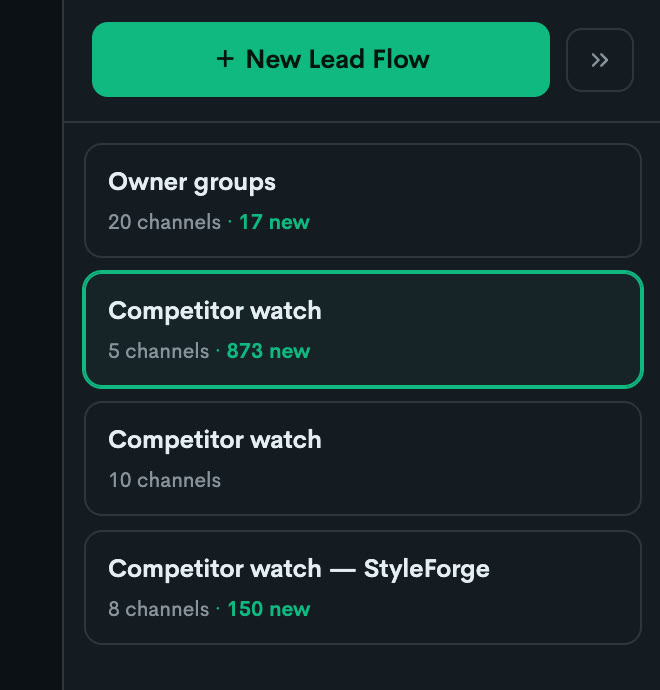
Pick the client you're working on. Then open Audiences in the left sidebar and click Lead Flows. Your flows sit at the top as cards, one per set of competitors. Open one and you're looking at its channels, and under each channel, the people.
one card per set of competitors; New Lead Flow starts another
The channels
the competitors' pages, the owner groups, the searches — each with its numbers
Monitor · Scan · Mine
the three buttons on every channel row
The people
graded A to D, with what they said and the flags
Resolve contacts
tick the ones you want; charged only when found
Export
the spreadsheet, best fits on top
Your flows · a real capture
The four buttons you'll press, in order
1Create Lead Flow2Scan for contacts3Mine4Export
The sidebar · Audiences
Audiences
Campaign Audience
Lead Flowsclick here
Coverage Opportunities
What's different here
The list comes from real interest
these are people who commented, replied or complained on a competitor's channel this month, not a bought list.
You see the price before anything runs
a small scan says how many people engaged and what a mine costs. Empty scans are free.
Graded against the client's own brand
every person is read against what the client actually sells, and the reason is printed on the row.
You name two competitors, and Claude finds their buyers.
Their LinkedIn pages, their X accounts, the owner groups, the searches. Free.
Step 2 · Name the competitors
Type the competitors' names, and Claude finds their public channels for you
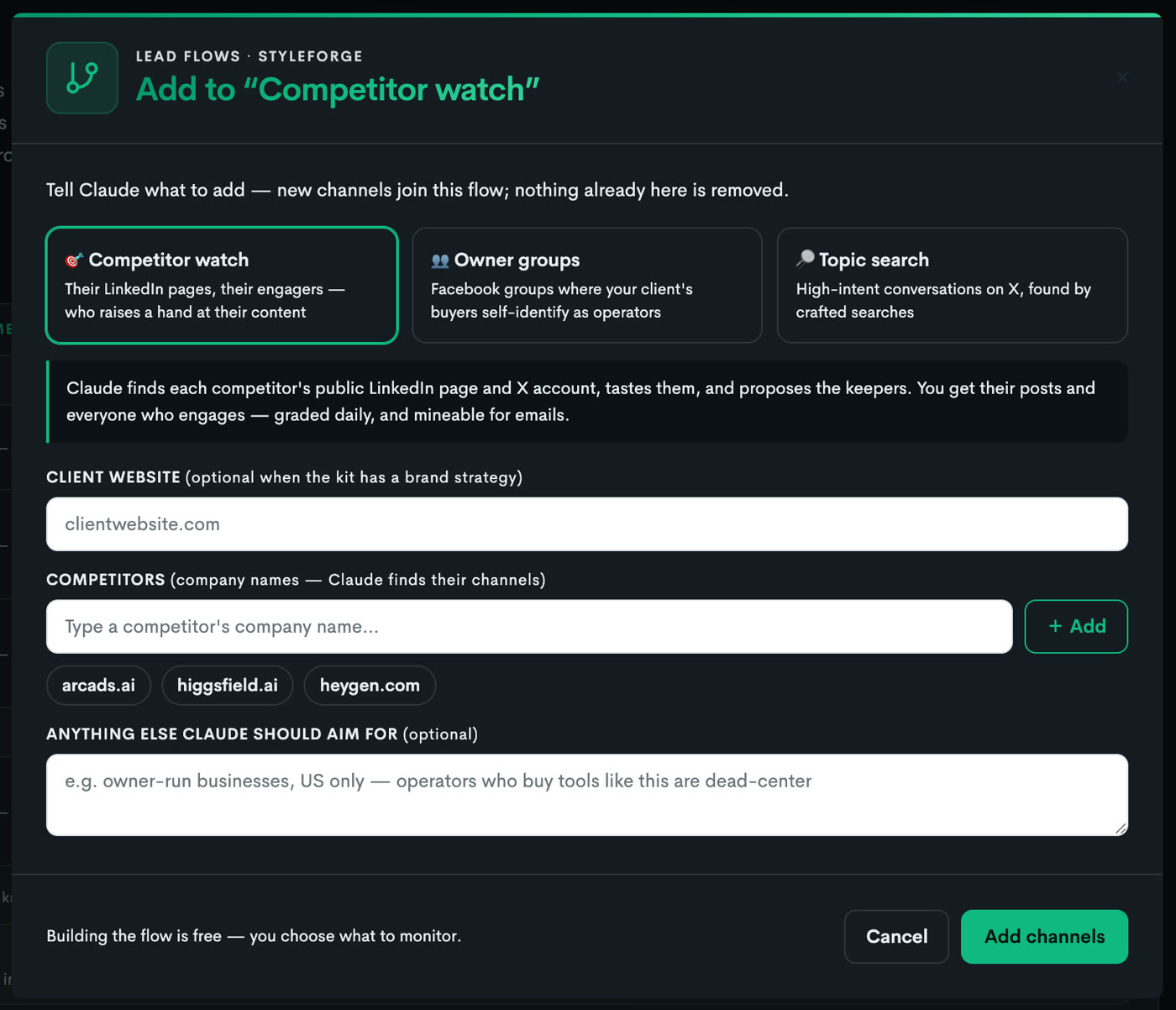
Click New Lead Flow. Type the competitors' names, even just their websites. Add a public Facebook group where the client's buyers gather if you know one, and a line about who you're after. Click Create Lead Flow. It's free. A few minutes later the channels land with real numbers on each: the competitors' LinkedIn pages and X accounts, the owner groups, and searches Claude wrote for high-intent conversations. Anything it looked at and passed on is listed with the reason.
Add to a flow · a real capturefree to build
Pick what kind of ground you want, type the competitors, add a line about who you're after, and click Add channels. New Lead Flow looks the same, for a fresh flow.
Reading the brand strategy…Resolving competitor pages…Searching Facebook groups…Crafting X searches…Judging fit against the brand…
The channels Claude found5 channels · 2 passed on
LinkedIn
Northgate Kitchens — company page
competitor · 3,400 followers · posts weekly
MonitorScan for contactsMine
X
@northgatekitchens
competitor · 2,100 followers · 4 posts a week
MonitorScan for contactsMine
LinkedIn
Hearth & Frame — company page
competitor · 1,900 followers · posts weekly
MonitorScan for contactsMine
Facebook
Kitchen Remodel Owners — Northeast
owner group · 8,200 members · 30 posts a day
MonitorScan for contactsMine
X
"kitchen remodel quote" near me
topic search · crafted search · high intent
MonitorScan for contactsMine
Passed on, with the reason
Hearth & Frame — X accountposts twice a year; nobody engages
Kitchen Design Ideas — Facebook groupa closed group; only public groups work here
You scan one channel, and see the size and the price.
How many people engaged, how many emails to expect, and what the mine costs. Empty scans are free.
Step 3 · Scan a channel first
Scan a channel and see how many people engaged, how many emails to expect, and the exact price, before you spend
Click Scan for contacts on a channel and pick a window: the last 30, 60 or 90 days. The scan counts how many people commented, replied or reacted in that window and tells you the honest odds of finding their emails on that platform. Then it quotes the mine. Nothing bigger runs until you say so, and a scan that finds nobody costs nothing.
LinkedIn
Northgate Kitchens — company page
competitor · 3,400 followers · posts weekly
MonitorScannedMine
Scan for contacts30 days60 days90 days
People to check
212
engaged in the last 30 days
Emails to expect
64 – 106
30–50% of people checked, on LinkedIn
The mine
quoted
the exact price, before you commit
Mine this channelNot nowThe quote is the most you'll pay. You're billed on the people actually checked.
Why scan first
See the real size
how many people actually engaged this channel in the window you picked
Honest odds
emails typically turn up for 30–50% of the people checked on LinkedIn, 20–40% on X
The price, up front
the mine is quoted before it runs; the quote is a ceiling, and you're billed on actuals
Empty means free
a scan that finds nobody costs nothing
Compare channels
scan two competitors and mine the crowd that's worth it
You mine it, and every findable email comes back graded.
A to D against the client's brand, with what each person said and the unhappy customers flagged.
Step 4 · Mine it
Every findable email, graded A to D, with who each person is and what they said
Click Mine. Every person in the window is checked for an email. The ones with emails are graded A to D against the client's own brand strategy, and the reason is printed on the row: who they are, what they said, and a flag when their own words show they're unhappy with the competitor or shopping for an alternative. No email, no grade. The list lands best-first, with the competitor's own staff left out, and it keeps working if you leave the page.
Mine · Northgate Kitchens — company page212 checked96 emailsA 18 · B 31 · C 29 · D 18
DR
Dana R.homeowner · planning a remodelAshoppingreplied on X
“Got three quotes and they're all over the place. How do you even compare them?”
MT
Marcus T.homeowner · Northgate customerAunhappy customercommented on LinkedIn
“Northgate pushed our install back twice. Anyone had better luck with a design-build firm?”
PL
Priya L.property manager · 14 unitsBcommented on LinkedIn
“Refreshing kitchens across a portfolio this year. Following for ideas.”
JO
Jordan O.realtorBreplied on X
“Sharing this with clients who ask what a remodel adds at resale.”
Also engaged — 47 more, graded lower for this flow. Still here, still yours to contact.
How the grade works
A needs their own words
a question, a pain point, a comparison — real signal, in what they wrote
A reaction alone caps at B
a like proves attention, not context
Unhappy customers flagged
when their own words complain about the competitor; the best sales context there is
Shopping flagged
when they're actively comparing options
Business type on the row
homeowner, property manager, realtor — filter to the slice you sell to
Ranked, never deleted
lower grades fold under Also engaged; you paid for the pull, you decide who matters
Or you switch on Monitor, and check in each morning.
New posts, new people, graded the same way. Pause any time.
Step 5 · Or monitor it daily
Turn on Monitor, and every morning the people who raised a hand at the competitor are waiting, graded
Click Monitor on a channel. Once a day it pulls the new posts and the people who commented, replied or reacted, grades the new faces the same way, and adds them to the list. Someone who has engaged before is remembered, so each morning is new signal, not a re-run. Pause any time; resume picks up where it left off.
X
@northgatekitchens
competitor · 2,100 followers · 4 posts a week
Monitoring ✓Scan for contactsMine
Pulling this channel's recent posts…Collecting the people engaging…Grading the new faces against your brand…
This morning · 3 new
DR
Dana R.homeowner · planning a remodelAshoppingreplied on X
“Got three quotes and they're all over the place. How do you even compare them?”
JO
Jordan O.realtorBreplied on X
“Sharing this with clients who ask what a remodel adds at resale.”
SK
Sam K.Creacted on LinkedIn
A reaction proves attention, not context — so this one caps at B and sits under “Also engaged”.
The morning check
New signal every day
the sweep runs once a day; the first one samples the past week
Their actual words, on the row
what they wrote, in full, with the post they answered readable in place
Published emails, caught for free
when someone has put their email in a bio or a post, the row is born with it
Pause and resume
the daily sweep stops; everything gathered stays; resume picks up where it left off
Or just ask
the morning check playbook reads the new faces and calls out the ones worth acting on
You tick the ones worth reaching, and export the list.
Charged only for a contact that's found. Best fits on top, with a Read Me sheet.
Step 6 · Resolve, then export
Tick the people worth reaching, resolve their contact details, and export the spreadsheet
On a monitored channel, tick the people you want and click Resolve contacts. You see the odds first, and you're charged only for a contact that's actually found. Then click Export. A real spreadsheet lands: every contact with their grade, who they are, what they said, the post link, and where the email came from, best fits on top, with a Read Me sheet explaining every column.
Contact EnrichResolve contacts (3)
DR
Dana R.homeowner · planning a remodelAshoppingreplied on X
MT
Marcus T.homeowner · Northgate customerAunhappy customercommented on LinkedIn
PL
Priya L.property manager · 14 unitsBcommented on LinkedIn
Dana R.dana@…found
Marcus T.marcus.t@…found
Priya L.—No contact found — nothing charged.
Export contacts (96)Export
GradeNameBusiness typeEmailWhat they saidSignal
ADana R.homeownerdana@…Got three quotes and they're all over the place…shopping
AMarcus T.homeownermarcus.t@…Northgate pushed our install back twice…unhappy customer
BPriya L.property managerpriya@…Refreshing kitchens across a portfolio this year.—
BJordan O.realtorjordan@…Sharing this with clients who ask what a remodel adds…—
ContactsRead Me
Best fits on top
A to D, the competitor's staff left out, the lower grades at the bottom
A Read Me sheet
every column explained, and the compliance note travels inside the file
Filter to your slice
one column for business type; homeowners, property managers, realtors
Then Claude writes the notes and sends them for you.
A safe number a day, on your yes, and nobody is written to twice.
Step 7 · Reach them
Let Claude write the notes and send them from your own email, a safe number a day
Connect your Gmail or Outlook to Claude and run the Work the warm list playbook. Claude takes the best grades first, reads why each person engaged, writes a short note about their interest, never quoting their comment back, and shows you the batch. On your yes it sends from your address, a safe number a day, and marks each person so nobody is written to twice. For your own new business, or for a client who pays you to fill their pipeline.
Today's batch · 8 of 96from hello@youragency.comSend these 8
ADana R.Subject: comparing kitchen quotes
Hi Dana — comparing remodel quotes is harder than it should be, because most aren't quoting the same job. If it helps, Bellhaven puts everything on one page with a fixed number. Happy to walk you through how to read the ones you have, no strings.
AMarcus T.Subject: a remodel that keeps its dates
Hi Marcus — a pushed install date is the worst part of a remodel. Bellhaven runs design and construction as one team, so the date on the plan is the date. If you're still deciding, I can show you what that looks like.
Each note rides their interest, never their comment. Replies are tracked, and a person who's been written to is marked.
Sent today
8
of a safe daily number
Replies so far
2
tracked on the row
Written to twice
0
every person is marked once sent
Left in the list
88
tomorrow's batch starts here
How the outreach works
Your own email
connect Gmail, Outlook or any email to Claude; it sends from your address
A note about their interest
why they engaged, in a sentence or two; never their comment quoted back
You approve every batch
Claude shows the notes; nothing goes out without your yes
A safe number a day
sent slowly, the way a person would
Nobody written to twice
every person is marked once sent, and replies are tracked
For you, or for a client
your own new business, or a client who pays you to fill their pipeline
Or you just ask Claude.
It builds, scans, mines, checks, resolves and writes. Five playbooks, one per stop.
Or · Say it to Claude
Or just ask Claude
Name the competitors. Claude builds the flow, scans the channel and tells you the price, mines it on your yes, reads you the morning's new faces, resolves the contacts you pick, and writes the notes. Five playbooks do the asking for you.
“Build a lead flow for Bellhaven watching Northgate Kitchens and Hearth & Frame. Scan Northgate's LinkedIn page for the last 30 days and tell me what a mine costs.”
runs it
the flow built, free → the channel scanned, price stated → the mine on your yes → the people, graded → the contacts resolved → the notes, sent from your email
Build the watch
the competitors' real channels, found and ready
Mine the audience
every findable email in the window, graded A to D
The morning check
who raised a hand since you last looked
Resolve contacts
emails, titles and companies on the people you picked
Work the warm list
today's batch, written and sent from your own email
Good to know
The quote is a ceiling. You're billed on the people actually checked, and a scan that finds nobody costs nothing.
No email, no grade. The mine hunts for emails first and grades only the people it found one for, so the number of contacts you get is a plain answer.
An A needs their own words. A reaction alone proves attention, not context, so reaction-only engagers cap at B.
Ranked, never deleted. Lower grades fold under Also engaged. You paid for the pull; you decide who matters.
On X, likes are private by design, so the repliers you see are the whole visible audience, and every one of them wrote something.
The video at the top is a real flow. Every person and competitor in the steps below is fictional; the real page fills with the client's own competitors.
The walk loops — every morning the monitored channels bring new people, and the list keeps growing.