I spent a day this week fine-tuning the SEO on StyleForge's own website, working from a report the platform had built after analysing it.
The best part was that I did not have to record any of it.
Normally, when I work on a client's website, I keep a record of what I changed — because that record is what I bill against. It is also the least enjoyable part of the day and the part I am worst at. I will happily make changes all afternoon; I will not reliably write them down. I have never once reached the end of a month with an accurate list.
This time Claude did all of it.
Here is the mechanism, because it is the part that actually matters. You connect the client's website to Claude — a WordPress plugin, Webflow, Wix, whatever the site runs on — or you point it at the code repository. Then you connect StyleForge's SEO Pulse alongside it.
Now Claude is holding both halves. It can see what the audit found, and it can make the change. And because it made the change, it records it straight back against the audit — which page, what the report said needed fine-tuning, and what was actually changed. That running log is the work report that can be submitted — the white-label work report the client receives.
So at the end of the month there is nothing to assemble. You hand the client a report that already lists every fix, every rewritten title, every keyword placed and every page added, with the before and after sitting next to each one.
A white-label client report that documents all of the work, and the detail behind every change.
What most SEO reports for clients actually contain
Open a typical monthly report and you will find metrics with arrows on them, a keyword table, some crawl errors, a chart of traffic, and a pile of data points that only an SEO person really cares about. The client's eyes roll back and they never read it.
Notice what that is. It is not a diagnosis — it is a data dump, handed over with the interpreting left as an exercise for the reader. Every number in it is true and none of it says what any of it means.
So the client does one of two things. They skim it, feel vaguely reassured that something is being measured, and file it. Or they ask you what it means, and you spend an hour on a call doing the interpreting the report should have done. Neither of those is worth what it cost to produce.
And none of it answers the question they are actually holding, which is: what did I pay you for last month? A list of numbers cannot answer that, and neither can a bare list of errors — any crawler produces one of those on its own, in about ninety seconds, for free. What earns the retainer is a real diagnosis of what is wrong and why, and then a record of what you did about it.
The half nobody prints
There are two honest halves to a client report and most tools only produce one.
The measured half is what a scan finds. Every page checked against the same rules, every failure flagged. That part is a commodity — any decent crawler does it, and most will show you an issue count trending down month over month.
But a falling issue count is not proof that you did anything. Numbers move for all sorts of reasons. What matters is whether a specific change you made can be tied to a specific check that now passes. That means recording the action, then letting the next scan judge it — and publishing the verdict whichever way it lands.
The agency's own half is everything no scan asked for — the keyword research, the new page, the FAQ rewrite, the navigation problem you found while you were in there. No crawler catches any of it, so unless somebody writes it down as it happens, it never reaches the client at all.
That second half is where the retainer actually goes. It is also the half that quietly disappears, because at month end nobody remembers the Tuesday afternoon they spent fixing something.
A real month, on a site you can check
Here is the record from my own site. I am using mine rather than a client's on purpose: every row in it points at a page on styleforge.io that you can open right now and verify. A client's report would look tidier and you would have to take my word for it.
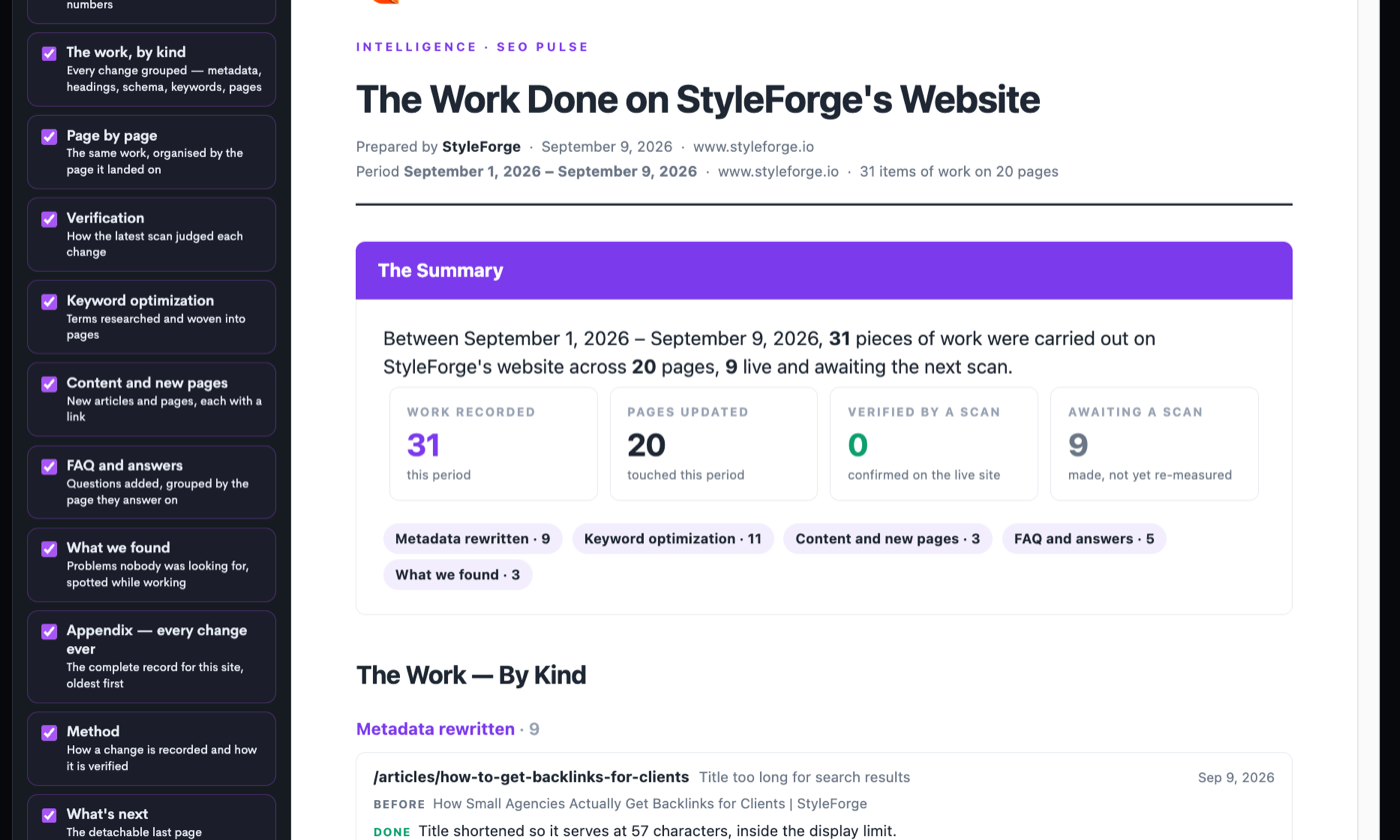
Thirty-one pieces of work across twenty pages: metadata rewritten on nine, keyword work on eleven, three new pages, five FAQ builds, and three problems found along the way that nothing had asked us to look for.
Each one carries its before and its after. The first entry in the picture is a page title that ran too long for search results — it says what it was, what was done, and what it says now. A client can check that in ten seconds.
How the record got written
Here is the part that makes this practical rather than aspirational, because nobody is going to keep a change log by hand for twelve clients.
I was not writing any of it down. I was working — connected to StyleForge from a Claude session, saying what I wanted done. As each change went live it was recorded: the page, the check it addressed, the old value, the new one, the date. By the end of the day the report existed because the work had happened, not because somebody sat down to write a report.
That is the only version of this that survives contact with a real month. A reporting discipline that depends on remembering will be abandoned in week three, and the client will get the crawler output again.
Whose name is on the report
A client never sees whose software produced their report. The one above says “Prepared by StyleForge” because it is StyleForge's own site. On a client engagement it carries the agency's name instead. Here is the same system on a real client — a med spa in Austin — prepared by the agency, with no trace of the tool that produced it.
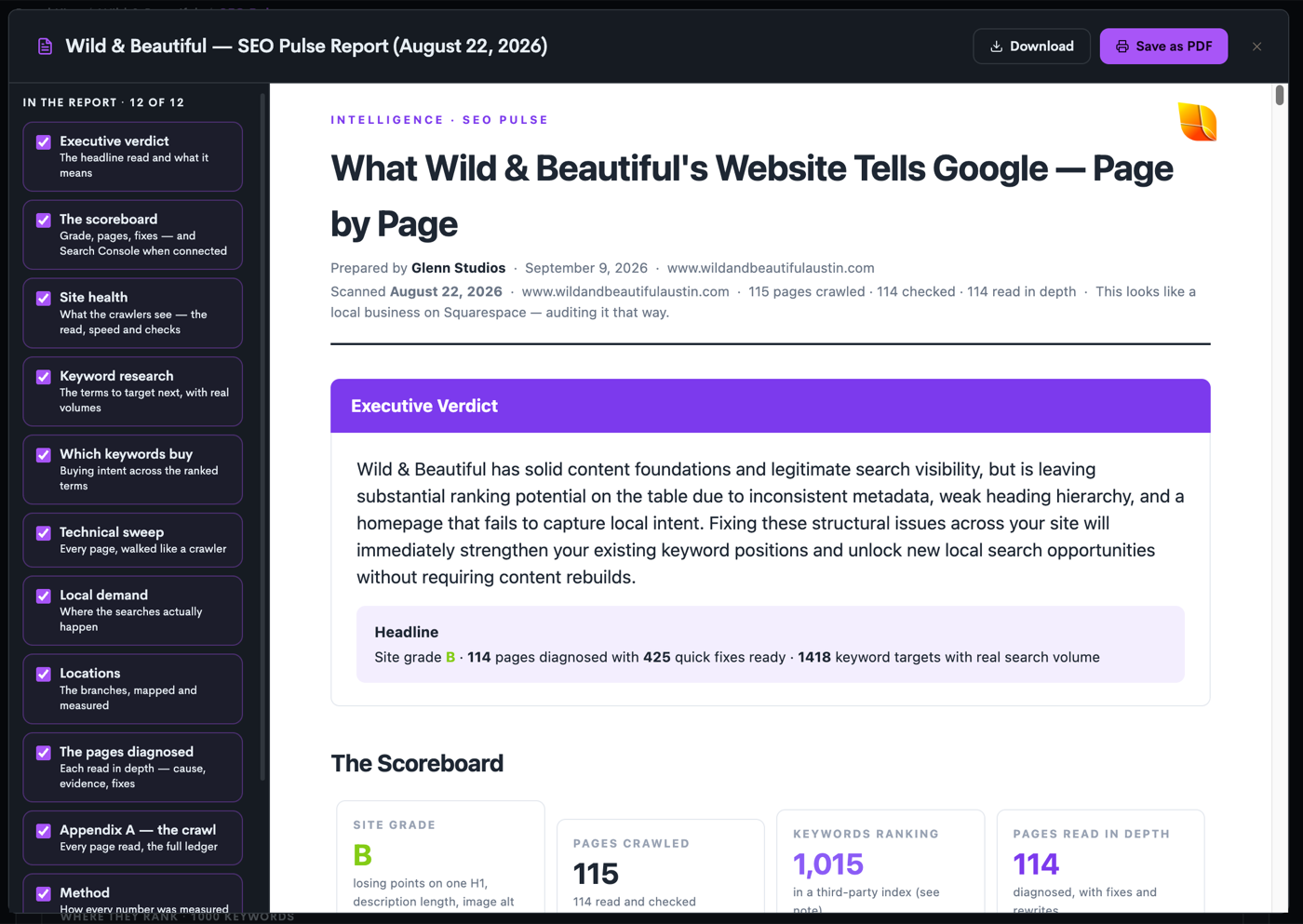
Two things in that header are worth pointing at. It opens with an executive verdict in plain language — what is wrong, what it is costing, what fixing it would do — before a single number. And the scoreboard underneath is specific enough to argue with: grade B, 115 pages crawled, 114 read in depth, 1,015 keywords ranking, 425 fixes ready.
That last number is the one that matters. The 425 fixes are the work the site actually needs, written so the client can read it themselves — what is wrong on each page, and what has to be done about it. They see the job in plain language before anybody quotes for it, and the agency walks in with the month already mapped out.
The one line to keep
Never make the client do the agency's interpreting, and never make the agency do the software's assembling.
A report that hands over raw numbers is asking the client to work out what happened. A report that takes a person a full evening to assemble is asking the agency to do a job the tooling should have done.
If you want the version of this that carries your own branding, that is white label client reports. If you want to see the audit that feeds it, that is SEO Pulse.
Frequently asked questions
Five things, in order: a plain-language verdict on the state of the site; what the scan found, measured and dated; what the agency actually did, each change with its before and after; what the next scan said about those changes; and anything found along the way that nobody was looking for. StyleForge produces the first two and the fourth automatically from the scan, and records the third and fifth as the work happens — so the report is a by-product of doing the work rather than a job at month end.
Monthly, using the same checks every time — a changing measurement makes every comparison meaningless. The value is in the delta rather than the snapshot: the same pages, the same rules, and a dated record of what changed between them. StyleForge locks the checks so each re-run is a fair comparison, and every recorded fix is re-measured by the next scan rather than assumed.
Not if it is white-labelled properly. A StyleForge report carries the agency's logo, colours and “Prepared by” line, with StyleForge attribution removed from every client-facing page. The branding also holds if a plan changes mid-engagement, so a report already sent never reverts to advertising the software to your client.
Depth the client could not have produced themselves, and a record of work they can verify. A crawler output is free and takes ninety seconds, so a report that only lists problems is hard to charge for. A StyleForge audit reads every page in depth — 115 pages crawled and 114 read in depth on the client example above, with 425 fixes ready to apply — and the work record alongside it shows what the retainer actually bought.
Yes, and a report that cannot is not evidence. StyleForge marks each recorded change verified, awaiting a scan, or still open, and prints the honest state — a report can and does go out reading “0 verified, 9 awaiting a scan”. A number that is capable of coming back badly is the only kind worth believing when it comes back well.
Where to go next
- White label client reports — the same reports carrying your agency's name.
- The hidden cost of the modern agency stack — what the reporting tool is one of ten of.
- What AI visibility is — the audit that sits alongside the SEO one.